Suica Card or Mobile Suica: Which Should You Use in 2026?
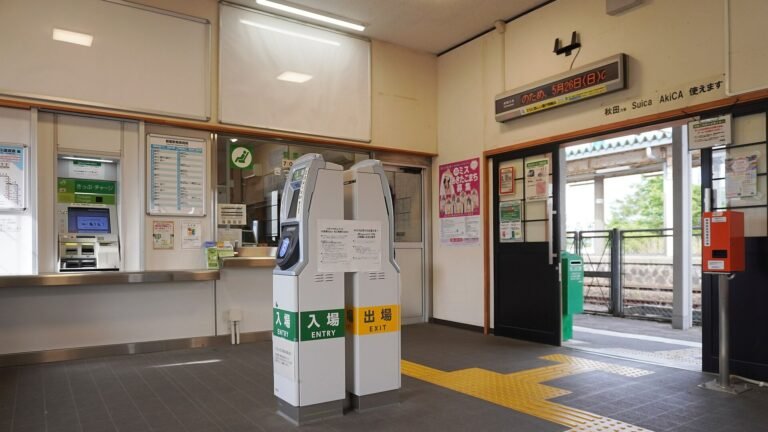
The rest of this guide sets the two versions side by side. Then it walks through phones, top-ups, refunds and buying a card at the station. The figures come from JR East, Apple and Google pages, also collected in our Suica card guide.
Suica card and Mobile Suica side by side
Start with the table.
| Item | Suica card | Mobile Suica |
|---|---|---|
| Price | 1,000 to 10,000 yen | No card to buy |
| Deposit | 500 yen, included in the price | No deposit |
| Where to get it | JR East machines and ticket offices | Apple Wallet or Google Wallet |
| Top up | Cash only, from 500 yen | Card in the phone; 1 yen units in Google Wallet |
| Balance limit | 20,000 yen | 20,000 yen |
| Refund | Balance minus 220 yen, plus 500 yen | Suica app or Mobile Suica member menu |
| If lost | Not reissued (My Suica can be) | Withdraw in the member menu |
| Phones | Not needed | iPhone 7 or later; Android 9 with Osaifu-Keitai |
The card comes in six prices. The JR East Suica card guide for visitors lists 1,000, 2,000, 3,000, 4,000, 5,000 and 10,000 yen for both adult and child cards. Each price includes the 500 yen deposit. Adult and child cards cost the same, but the child card pays the child fare at the gate.
The phone version has no card to hand back, so there is no deposit. Mobile Suica does not need the 500 yen deposit, as our Suica on iPhone page notes. On an iPhone you add Suica to Apple Wallet. On an Android phone you add it to Google Wallet or use the Mobile Suica app.
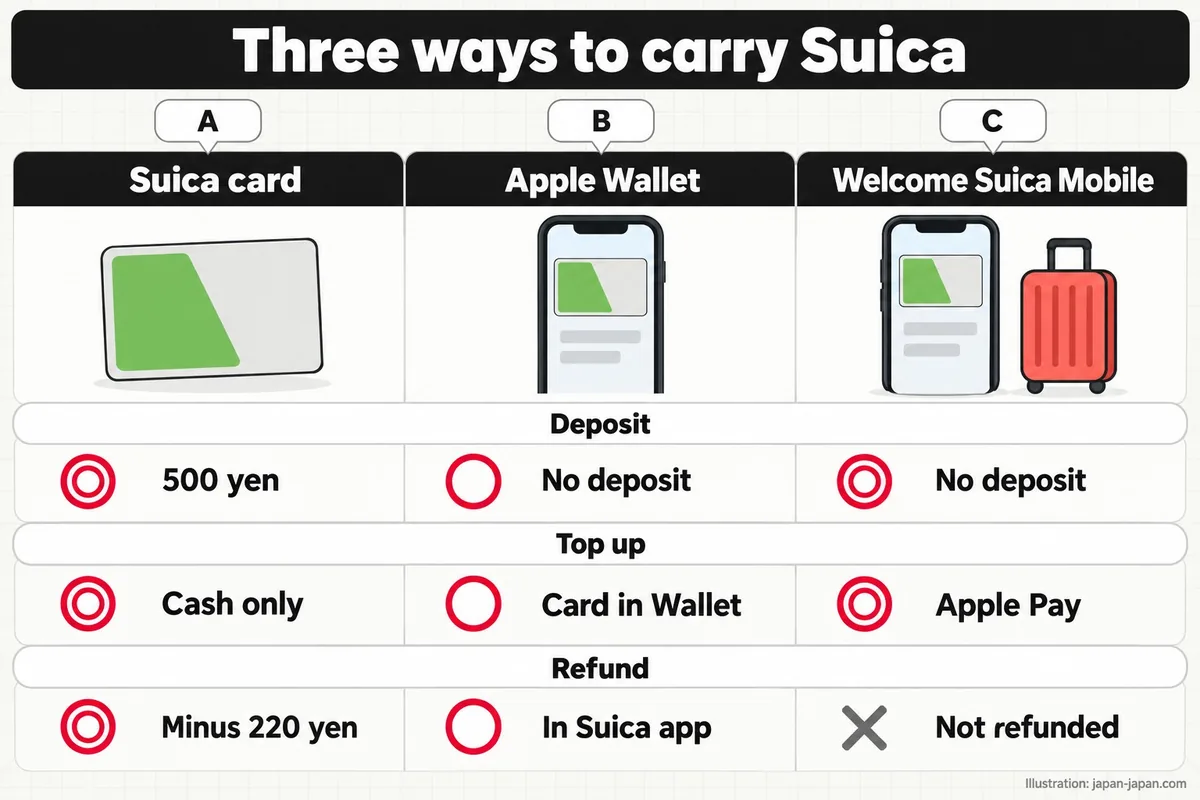
The drawing below compares three choices on deposit, top-ups and refunds: the plastic card, Suica in Apple Wallet and the visitor app Welcome Suica Mobile.
Some rules are the same for both. JR East says Suica works only inside each area, and you cannot ride from one area into another. Its own example is a trip from the Tokyo metropolitan area to the Sendai area. For a journey like that, buy a ticket in advance.
The same goes for faster trains. To ride a limited express, an express or a Green Car, you need a separate limited express ticket on top of the Suica fare. JR East says it will merge its six Suica areas into one by the end of fiscal 2026 (March 2027). It has not set a start date yet.
Which phones can carry Suica
The phone decides which version you can use.
On an iPhone, Apple says Suica needs an iPhone 7 or iPhone 7 Plus or later. Other transit cards in Apple Wallet need an iPhone 8 or later with the latest iOS. You also need an Apple Account signed in with two-factor authentication and an eligible payment card in Apple Wallet. An Apple Watch works for Suica from Series 2, but only a watch bought in Japan.
Check these four points before you leave home. The drawing shows them as a short list.
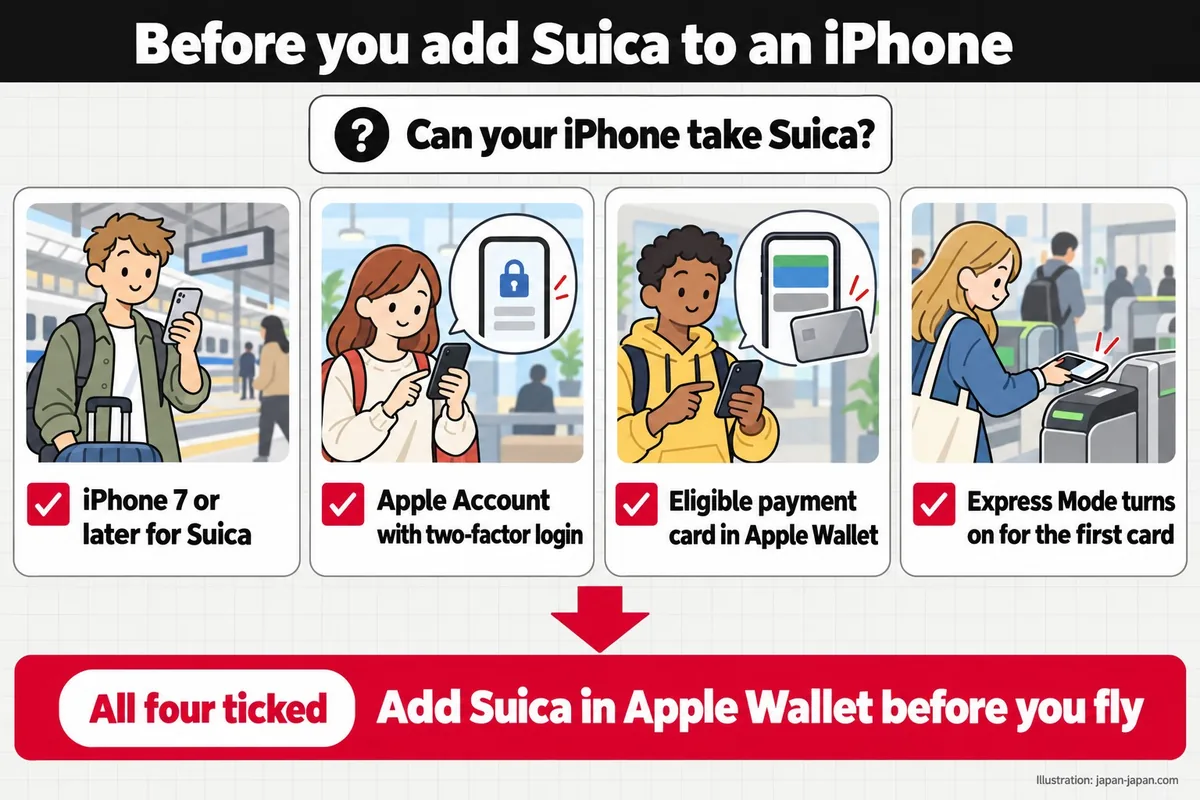
Two Apple details matter at the gate. When you add your first transit card, Express Mode turns on automatically, so you tap without unlocking the phone. Express Mode can be on for only one card at a time. The phone must be switched on, but it does not need a mobile or Wi-Fi connection.
On Android, the rules come from Google and JR East. Google says the phone must run Android 9 or higher. For e-money cards such as Suica, it must also support Osaifu-Keitai. In Japanese this is おサイフケータイ (Osaifu-Keitai, “wallet phone”), the feature that lets a phone act as an IC card.
A phone can hold only one e-money card of each type at a time. Google lists Suica on all Google Pixel Watches and on Galaxy Watch 6 and later, but only on models bought in Japan. Our Suica on Android page keeps the full list of what JR East and Google say.
Once Suica is in the phone, you hold it over the gate reader like a card.
Apple Pay users have one more rule from JR East. The JR East Mobile Suica getting started page tells owners of Apple devices to use Suica on Apple Pay rather than the Mobile Suica app.
Topping up: cash at machines or a card in your phone
The card only takes cash.
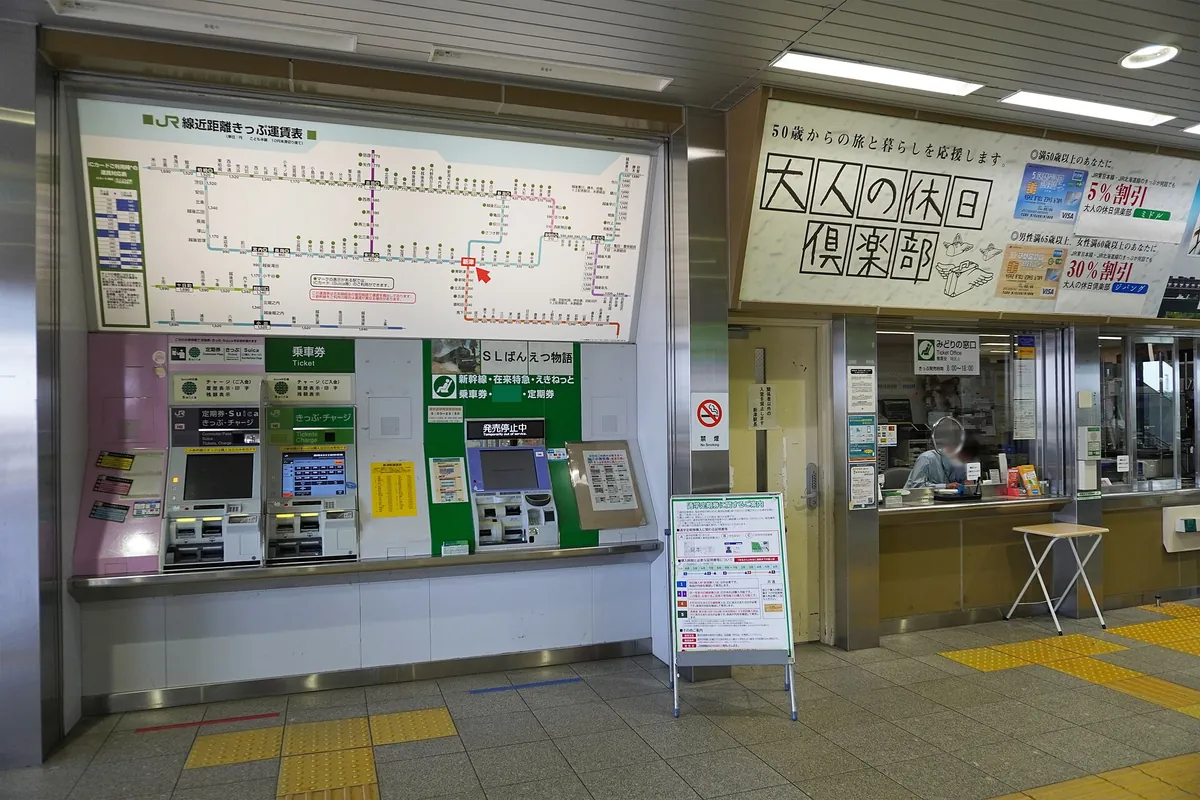
You top up a Suica card at regular and multifunction ticket machines, and at fare adjustment machines with the nationwide mutual use symbol. JR East allows top-ups of 500, 1,000, 2,000, 3,000, 5,000 or 10,000 yen. You can top up as often as you like, but the balance stops at 20,000 yen. A credit card cannot be used for a Suica card top-up.
The photo shows ticket machines of the kind JR East means.
On an iPhone, you top up from the payment card in Apple Wallet. There is no machine and no cash involved.
The Mobile Suica app works differently. To join, JR East asks for a compatible phone with a phone number set and a credit card. You can sign up any time between 4 am and 2 am the next day. The app accepts View Card, JRE BANK Debit, JCB, VISA, Mastercard, American Express, Diners Club and JR Tokai Express Card.
There are two catches for visitors. The app takes only cards that use 3-D Secure identity checks. JR East also says credit cards and prepaid cards issued overseas generally cannot be registered.
Google Wallet has its own top-up rules. The JR East Suica on Google Pay page says you can top up in units of 1 yen and register several credit cards. Google’s list for Japan shows top-ups with nearly all credit, debit and prepaid cards issued in Japan. You can also pay cash at nearly all convenience stores in Japan.
Our guide to topping up an IC card covers the machines, shops and phones in one place.
Deposit, refunds and lost phones
Getting money back works differently for each version.
For the card, JR East returns the balance and the deposit together. It takes a 220 yen handling fee from the balance, then adds the 500 yen deposit. Its own example: a card with 1,000 yen on it brings back 1,280 yen.
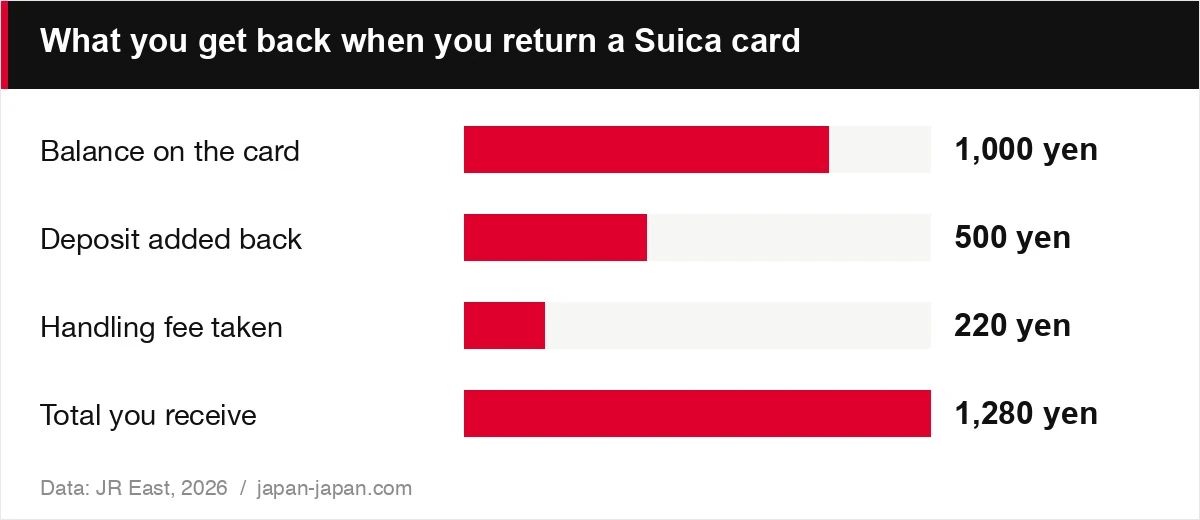
| Item | Value | Note |
|---|---|---|
| Balance on the card | 1000 yen | |
| Deposit added back | 500 yen | |
| Handling fee taken | 220 yen | deducted |
| Total you receive | 1280 yen |
The chart shows that example step by step. If the balance is lower than the fee, you still get the full 500 yen deposit. With 100 yen left, JR East takes the 100 yen and returns 500 yen.
A JR East Suica goes back only to a JR East station. A Suica sold by another company, such as Tokyo Monorail, goes back to that company. The Tokyo Monorail Suica and IC card guide also notes the 500 yen deposit on its cards. At a JR East station, look for the sign みどりの窓口 (Midori-no-madoguchi, ticket office).
A Suica card that you do not use for 10 years becomes invalid. You can still claim the balance minus the fee, plus the deposit. A lost Suica card cannot be reissued. A My Suica card, which carries your name, can be reissued.
Moving a card into your iPhone changes the deposit rules. Apple says the deposit is added to the transit card balance in Apple Wallet. After the move, the physical card no longer works.
The Mobile Suica app follows a different rule for commuter passes. The JR East Mobile Suica card switch guide says the old pass stops working. From the next day, take it to a ticket office in the JR East Suica area and get the 500 yen deposit back.
On Android, Google Wallet cannot refund Suica. You withdraw in the Mobile Suica app or in the member menu of the Mobile Suica PC site. If you lose your phone, withdraw through that member menu at once, so no one else can spend your balance. Our IC card refunds page covers the other cards.
Welcome Suica Mobile for short trips
JR East also makes a visitor version for the iPhone.
The JR East Welcome Suica Mobile app page describes an iOS app that issues and tops up Suica. Once issued, the Suica is valid for 180 days. The balance left at the end is not refunded and expires 180 days from the date of issue.
The app has limits. You must be 13 or older. It works only on devices that support Apple Pay, and some versions of iOS and watchOS are not supported. The App Store lists an iPhone with iOS 17.2 or later. JR East marks its page as current as of March 2026.
You top up with the card registered in Apple Pay. JR East also notes that some countries restrict the download and the top-up feature by law. In those countries, you may have to wait until you land in Japan.
Set it up before you fly. The chart lists the steps JR East gives.

In words: download the app, agree to the terms, set a secret keyword for inquiries and turn on location information. The app uses your location to decide whether you can add value. Then top up with a card in Apple Pay.
Android users are not covered yet. JR East is working on Welcome Suica Mobile for Samsung Galaxy phones sold overseas, in the first half of 2027. The phones covered are Galaxy models released in 2027 or later, and JR East will name the regions later. Our Welcome Suica Mobile page tracks the details.
Many visitors weigh the app against the plastic Welcome Suica sold at the airports, shown here at Narita.
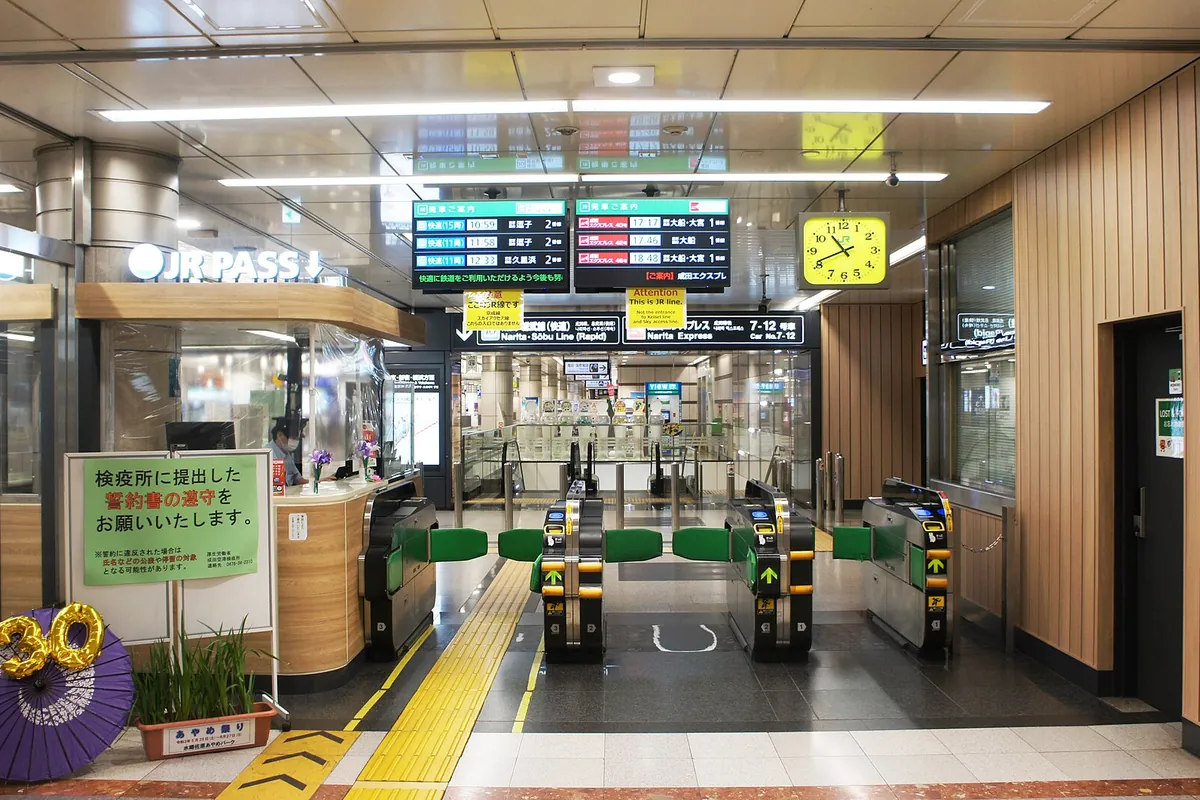
The card version lasts 28 days and has no deposit. We compare the two in Welcome Suica vs Suica, so we do not repeat it here. New rules are coming too. From 20 October 2026 the Mobile Suica app adds the code payment teppay. Our roundup of Suica changes for 2026-27 explains what changes.
Buying a Suica card at the station
You buy the card at a JR East station.
The JR East where to buy Suica and My Suica page lists four places. They are multifunction ticket machines, ticket offices, operator-assisted reserved-seat machines and the ticket offices at JR East Shinkansen stations. The plain reserved-seat ticket machines do not sell Suica cards. Stations with only partial Suica support do not sell them either.
Bring cash or a View Card. JR East says a Suica card and a My Suica cannot be bought with any other credit card.
The photo shows the card itself, the one you return later for the deposit.

Children need the registered version. There is no unregistered child Suica card, so a child gets a My Suica. You buy it at a ticket office or an operator-assisted machine, with ID for the child. A child Suica stays valid until 31 March of the year the child graduates from elementary school.
The card was hard to get for a while. Because of a worldwide semiconductor shortage, JR East stopped selling unregistered Suica cards from 8 June 2023. Registered cards came back on 1 September 2024, and unregistered cards on 1 March 2025.
At the airports, the counters sell Welcome Suica and other visitor cards. Our pages on IC cards at Narita Airport and IC cards at Haneda Airport list the counters and hours. The where to buy Suica page covers the city stations.
Which one should you choose?
Answer two questions about your phone.
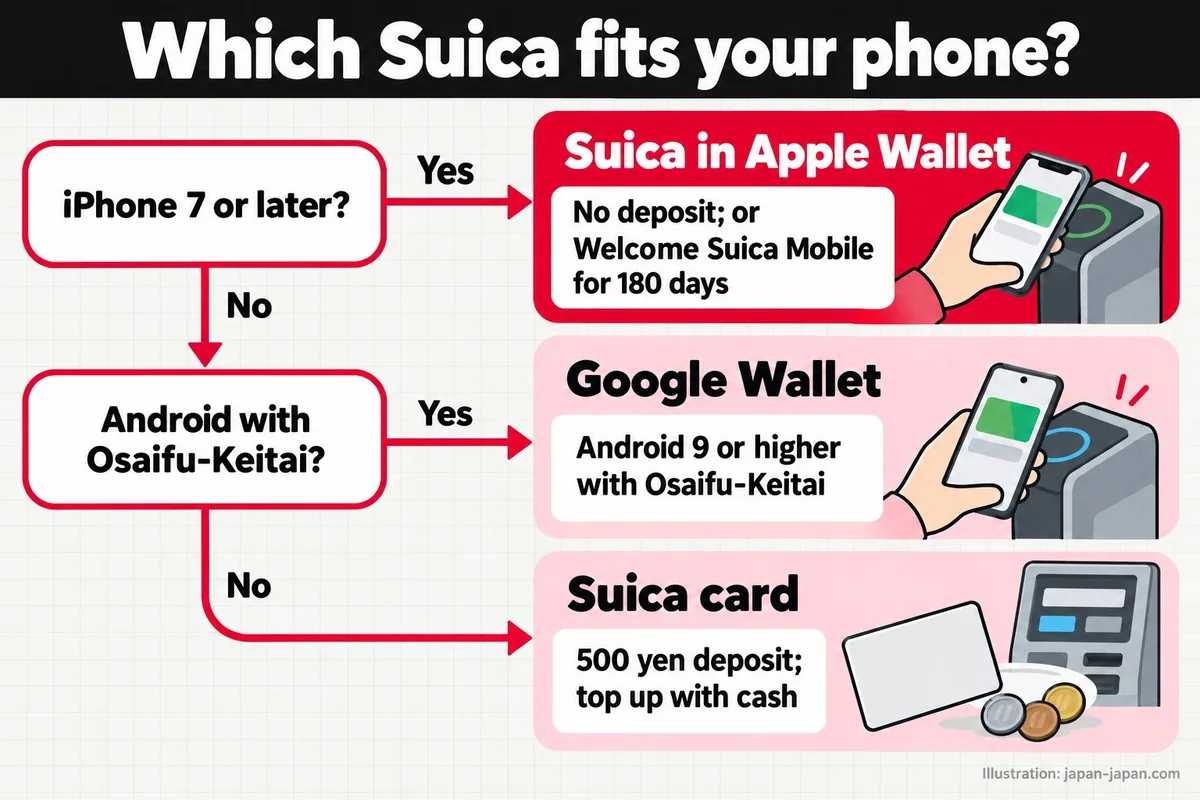
The drawing follows the same logic as the list below. Each choice uses the facts from the sections above.
- iPhone and a refund at the end: add Suica to Apple Wallet. There is no 500 yen deposit, and you refund it in the Suica app.
- iPhone and a short trip: use Welcome Suica Mobile. It lasts 180 days and the balance is not refunded.
- Android with Osaifu-Keitai: add Suica to Google Wallet. You need Android 9 or higher and a top-up method that works in Japan.
- Any other phone: buy a Suica card. It costs from 1,000 yen with the 500 yen deposit, and you top up with cash.
- Children: buy a child My Suica at a ticket office.
Charge your phone before a long day out. Apple says the device must be turned on to ride, and a phone that is off cannot pay the fare.
The card suits people who would rather not depend on a phone at all. Hand it in at a JR East station before you fly home, and you get the balance minus 220 yen, plus the 500 yen deposit.
Card or phone: what 98 people in Japan use
On 13–14 October 2026, japan-japan.com ran an online survey of people living in Japan about 32 travel choices. 130 people answered. We removed answers that looked machine-written, one from outside Japan and most of those that contradicted themselves, which left 98. Shares below are of the 98 respondents unless a smaller group is named; they describe these people, not all travellers in Japan. See all 32 comparisons and how we asked.
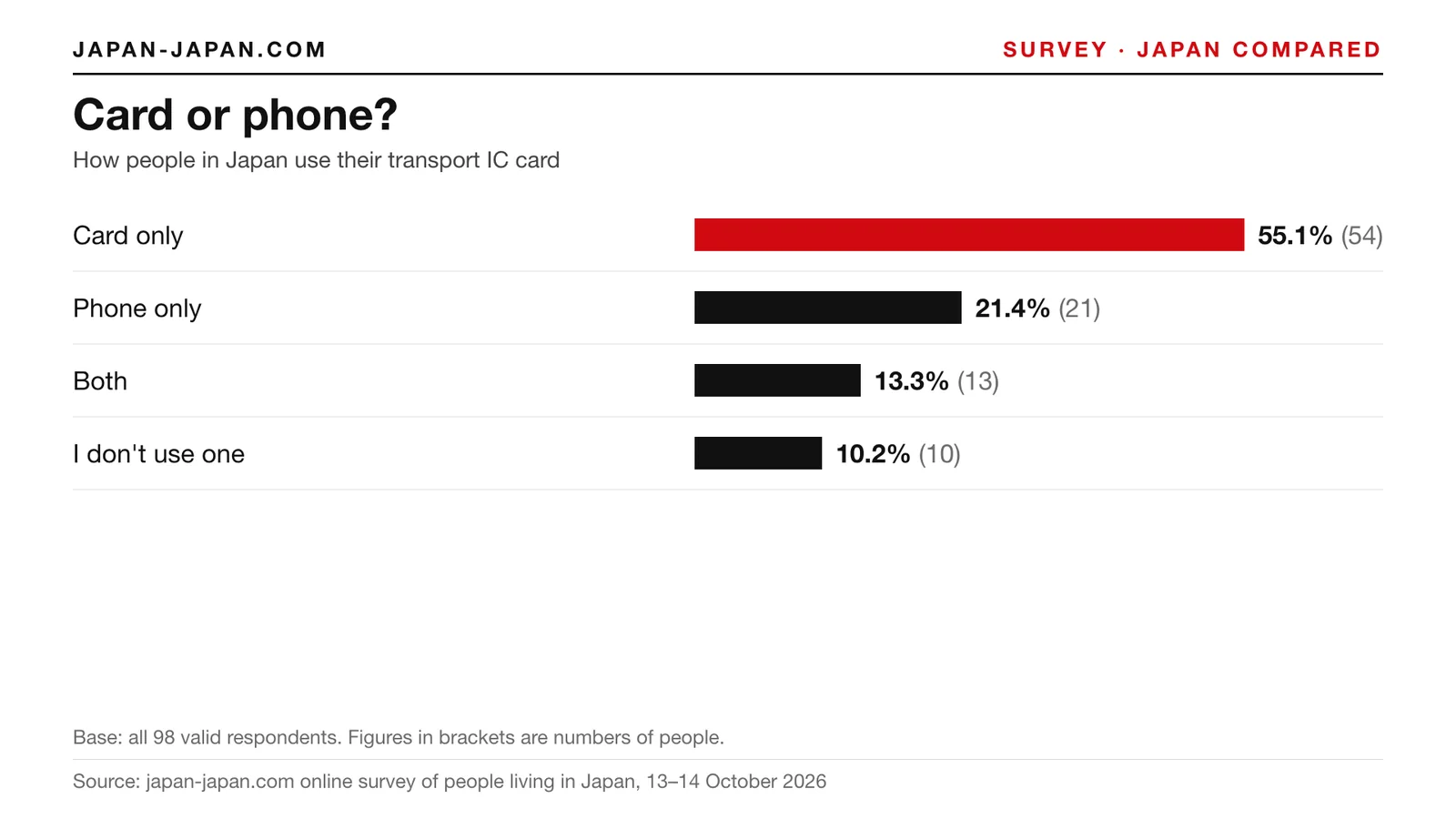
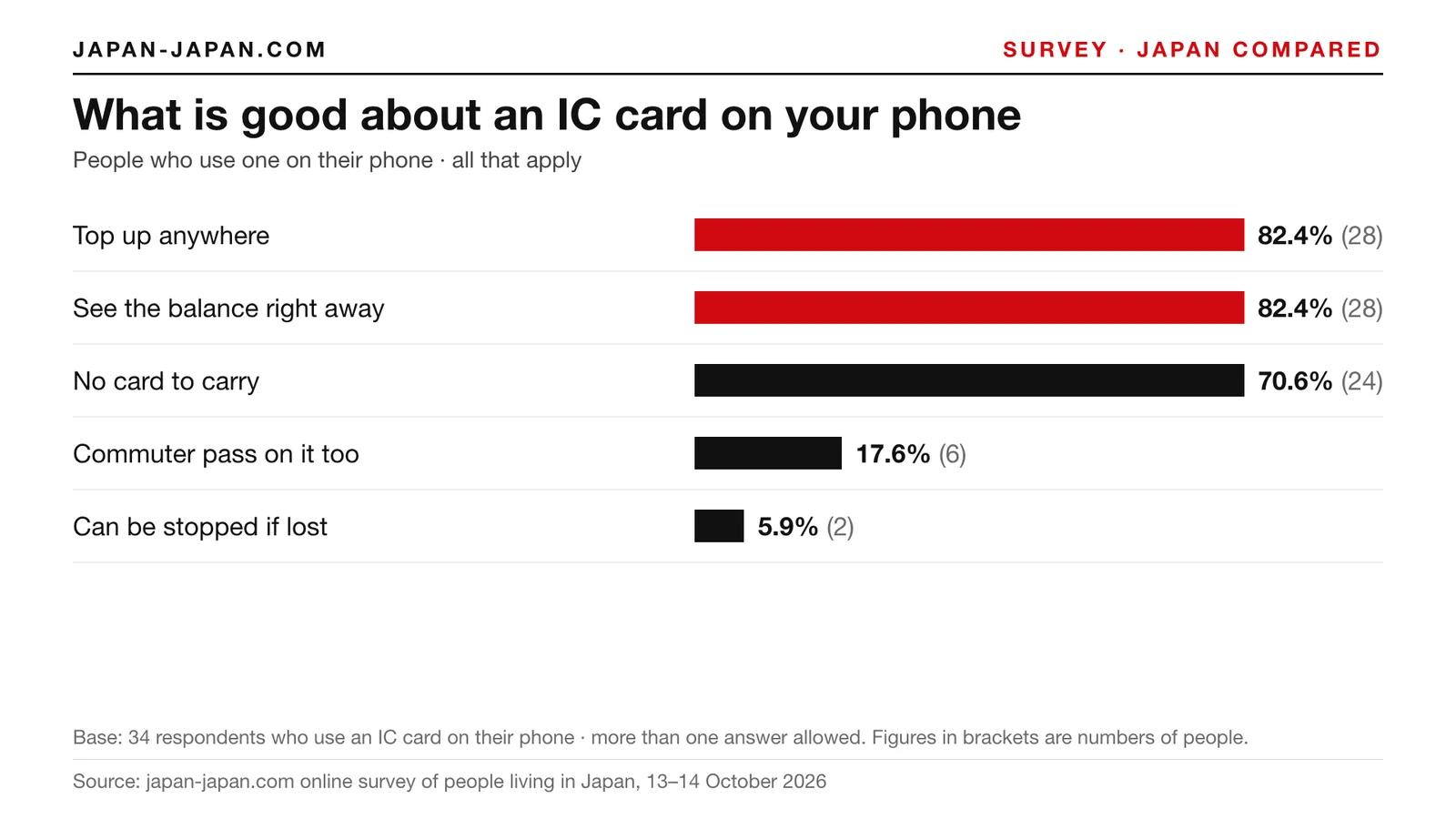
55.1% (54 people) use their transport IC card only as a card, 21.4% (21 people) only on a phone and 13.3% (13 people) both. Of the 34 who use it on a phone, the good points they named most were topping up anywhere (82.4%), seeing the balance right away (also 82.4%) and not having a card to carry (70.6%).
“Not being able to top up on the spot (on my phone).”
— Man in his 20s, Tokyo. Original Japanese (excerpt): 「急にチャージができないこと。(携帯で)」
FAQ
Can I use Mobile Suica with a credit card issued outside Japan?
Not in the Mobile Suica app, as a rule. JR East says credit cards and prepaid cards issued overseas generally cannot be registered. The app also needs cards with 3-D Secure. On an iPhone, Apple asks for an eligible payment card in Apple Wallet instead.
Do I get the 500 yen deposit back if I move my Suica card to my iPhone?
Yes, inside Apple Wallet. Apple says the deposit is added to the transit card balance in Apple Wallet. The plastic card stops working after the transfer.
Can I use Suica on an Android phone bought outside Japan?
Only if it meets Google’s rules. Google says the phone must run Android 9 or higher and support Osaifu-Keitai for e-money cards such as Suica. If your phone does not support Osaifu-Keitai, buy a Suica card instead.
Can I get a refund on Welcome Suica Mobile?
No. JR East says the remaining balance is not refunded. It expires 180 days from the date of issue, so spend it on trains and shopping during your trip.
About the author




.jpg)